Built to connect with everything you run
Kabaido CPQ plugs into your existing stack - ERP, CRM, finance, manufacturing, and productivity tools. Pull live data into every quote, push accepted quotes into downstream systems, and let SAM keep it all in sync.
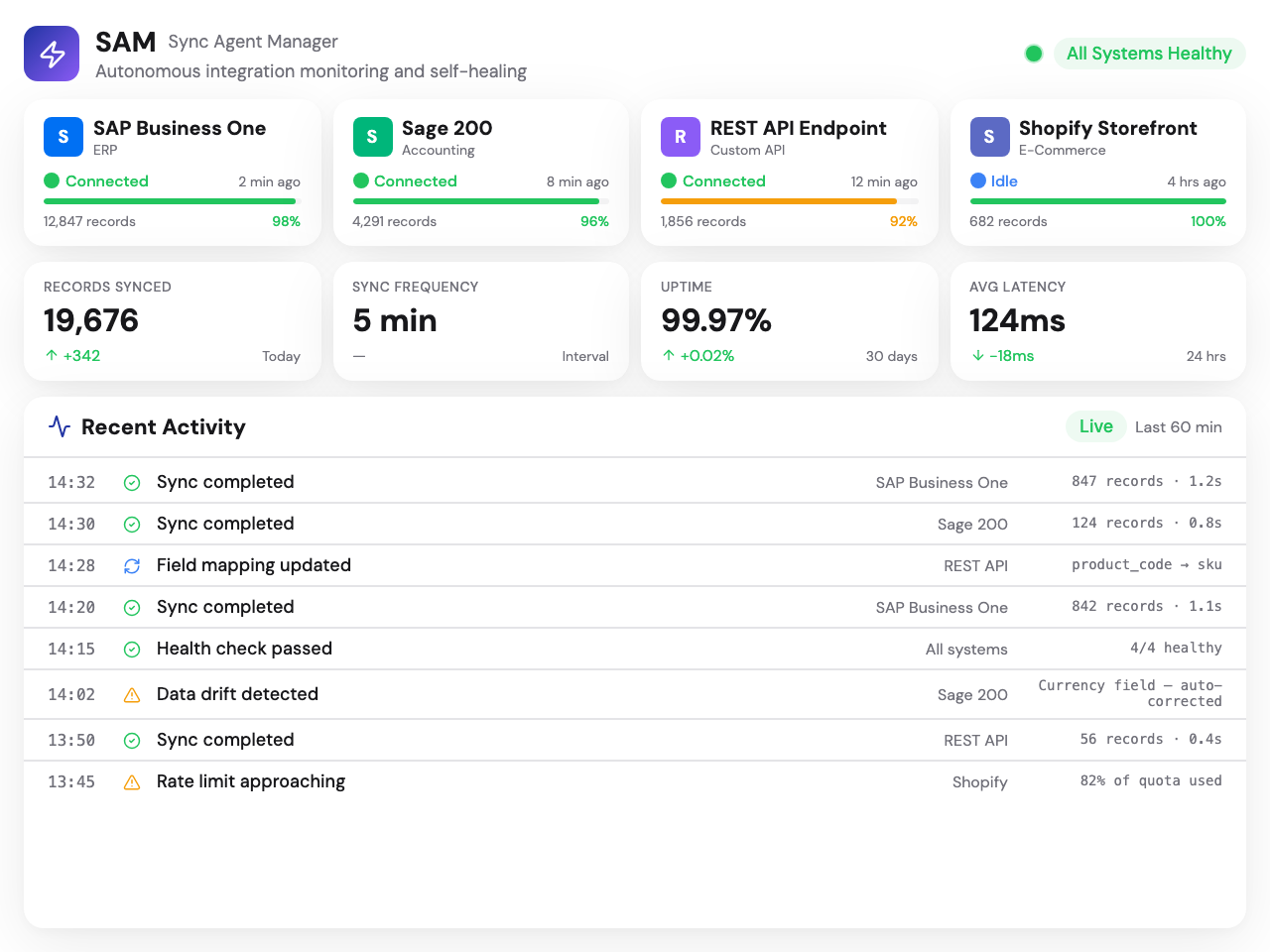
Connects with the tools you already use

















Plus custom integrations for any system with a REST API, webhooks, or file-based import/export.
Why connect your systems
Integrations turn Kabaido from a standalone quoting tool into the central node in your operations.
Zero double entry
Customer data, material costs, and inventory levels flow in automatically. Your team quotes - they don't re-key data between systems.
Always-current data
Quotes use live pricing, real stock levels, and up-to-date customer records. No stale spreadsheets, no outdated rate tables.
Automatic handoff
Accepted quotes flow into ERP as orders, into finance as invoices, into CRM as won deals. No copy-paste, no lag.
Full audit trail
Every sync is logged. Who changed what, when, in which system. Complete traceability from quote to order to invoice.
Two directions, one platform
Kabaido integrations work in both directions - pulling data in for smarter quoting and pushing data out for seamless fulfilment.
Data In
Pull real cost data, inventory levels, customer records, production metrics, and machine availability directly into Kabaido's quoting engine. Every quote starts with current, accurate data - not stale spreadsheets.
Data Out
Accepted quotes flow out as sales orders, invoices, production jobs, and CRM updates. No re-keying data. Kabaido pushes structured quote data into your downstream systems automatically.
Meet SAM - your integration agent
Systems, Applications & Manufacturing
SAM is the intelligence layer between Kabaido and every system it connects to. It manages data mapping, monitors connection health, and resolves issues before they affect your quoting.
Seamless transitions
SAM handles data mapping, format conversion, and system handoffs. Switch systems or add new ones without rebuilding your quoting workflow.
Continuous monitoring
Every connection is watched for breakage, latency, or inconsistency. SAM validates data integrity, checks sync health, and reports status in real time.
Self-correction & alerting
When SAM detects data drift - a price mismatch, stale inventory, a broken token - it either self-corrects or alerts your team before issues compound.
Custom field mapping
Map any Kabaido quote field to your system's corresponding fields. Transformation rules handle date formats, unit conversions, and code lookups automatically.
Auto-corrected: price mismatch
SAM detected a €0.12 unit cost drift in SAP material M-4401. Resolved by re-syncing from source.
Five categories, one unified approach
Each integration category serves a distinct purpose in your quoting workflow. Here's what connects and why.
ERP
↔BidirectionalSync quotes, orders, and inventory with your ERP system
Your ERP is the backbone of your operations. Kabaido connects bidirectionally - pulling inventory, BOMs, and cost data into quotes, and pushing accepted quotes into your ERP as sales orders. No double entry, no copy-paste errors, no lag between quoting and fulfilment.
SAP
↔BidirectionalBi-directional sync with SAP S/4HANA and ECC. Pull material master data, BOM structures, and pricing conditions into Kabaido. Push accepted quotes as sales orders with full line-item detail.
Oracle
↔BidirectionalConnect to Oracle ERP Cloud or E-Business Suite. Sync item catalogues, customer accounts, and pricing lists. Export approved quotes as Oracle sales orders with custom attribute mapping.
Microsoft Dynamics
↔BidirectionalIntegrate with Dynamics 365 Finance & Operations or Business Central. Import product catalogues and customer records. Push quote-to-order data with configurable field mapping.
Epicor
↔BidirectionalPurpose-built for Epicor Kinetic and Prophet 21. Pull part master data, job costing, and inventory levels. Push accepted quotes into Epicor as sales orders with routing details.
Infor
↔BidirectionalConnect to Infor CloudSuite Industrial (SyteLine) and Infor LN. Sync item data, cost centres, and warehouse inventory. Export quotes as orders with Infor-native document formats.
CRM
↔BidirectionalKeep your sales pipeline and quotes in perfect sync
Your CRM tracks relationships, Kabaido tracks quotes. Connect them so your sales team sees quote status, pricing, and win/loss data directly in their CRM. Opportunities link to quotes automatically, and quote acceptance updates your pipeline in real time.
Salesforce
↔BidirectionalNative Salesforce integration. Opportunities sync bi-directionally - create quotes from Salesforce opportunities, update opportunity status when quotes are accepted or lost. Custom objects for quote line items.
HubSpot
↔BidirectionalConnect deals and contacts between HubSpot and Kabaido. Quote creation triggers from deal stages, and quote outcomes update deal properties. Activity timeline shows quote events.
Pipedrive
↔BidirectionalLink Pipedrive deals to Kabaido quotes. Pull contact and organisation data into quotes. Push quote values and status back to Pipedrive deal fields and activity logs.
Zoho
↔BidirectionalIntegrate with Zoho CRM potentials and contacts. Sync account data into Kabaido for quote creation. Push quote status, values, and win/loss data back to Zoho CRM records.
Finance
←Data OutTurn accepted quotes into invoices and track revenue
When a quote becomes an order, your finance system needs to know. Kabaido pushes accepted quotes into your accounting platform as invoices, sales orders, or revenue records - with line-item detail, tax calculations, and payment terms intact.
QuickBooks
←Data OutPush accepted quotes to QuickBooks Online as estimates or invoices. Sync customer records and item lists. Revenue data flows into your QuickBooks reports automatically.
Xero
←Data OutCreate Xero invoices from accepted Kabaido quotes. Map line items to Xero account codes and tax rates. Contact sync keeps customer records consistent across both systems.
Sage
←Data OutConnect to Sage 50, Sage 200, or Sage Intacct. Export accepted quotes as sales orders or invoices with full line-item breakdown, cost centres, and department allocation.
FreshBooks
←Data OutGenerate FreshBooks invoices from accepted quotes. Client records sync automatically. Time-based billing and expense data can feed into Kabaido cost calculations.
Manufacturing
→Data InConnect directly to your production floor systems
Manufacturing integrations bring real production data into the quoting process. Pull cycle times from MES, machine status from SCADA, toolpath costs from CAM software, and design data from CAD - so every quote reflects actual shop floor reality.
MES Systems
→Data InPull real cycle times, setup durations, and production efficiency data from your MES. Actual production data feeds into Kabaido cost models so quotes reflect real - not estimated - operation times.
SCADA
→Data InConnect to SCADA systems for real-time machine availability and utilisation data. Know which machines are available, their current load, and estimated availability windows for lead-time quoting.
Mastercam
→Data InImport toolpath data and machining time estimates from Mastercam. CAM-calculated cycle times feed directly into Kabaido pricing models - no manual time estimation needed.
SolidWorks
→Data InExtract geometry data, material volumes, and feature recognition from SolidWorks models. Design parameters feed into configurator rules and cost calculations automatically.
Productivity
↔BidirectionalWork where your team already works - spreadsheets, email, docs
Not every integration needs an API. Productivity integrations connect Kabaido to the tools your team uses daily - Excel for data import/export, Google Workspace for collaboration, and email for quote delivery and RFQ intake.
Excel
↔BidirectionalImport product data, pricing tables, and customer lists from Excel spreadsheets. Export quotes, reports, and analytics as formatted Excel workbooks. Bulk operations via spreadsheet upload.
Google Workspace
↔BidirectionalSync with Google Sheets for collaborative data management. Store quote documents in Google Drive. Use Google Calendar for follow-up scheduling and delivery date tracking.
Gmail
↔BidirectionalSend quotes directly from Kabaido via Gmail. Incoming RFQ emails are parsed and routed to the quoting queue. Email thread history links to quote records for full context.
Outlook
↔BidirectionalSend quotes via Outlook. RFQ emails from your Outlook inbox are captured and linked to Kabaido quotes. Calendar integration for quote follow-up reminders and delivery milestones.
Two levels of integration
Start with file-based exchange. Upgrade to real-time API sync when you're ready. Both managed by SAM.
File-based integration
Import and export data using structured files. Works with any system that can read or write CSV, XML, JSON, or PDF.
- CSV, XML, JSON, and PDF file formats
- Manual, scheduled, or on-approval triggers
- No API credentials required
- Upload product data and pricing tables
- Export quotes as structured files
- Bulk operations via spreadsheet upload
- Works with any system from day one
Real-time API integration
Live bidirectional connections via API. Data flows in real time. SAM monitors, maps, and self-corrects continuously.
- Real-time bidirectional API sync
- Continuous monitoring by SAM
- Auto-correction and drift detection
- Custom field mapping and transformation
- Webhook support for event-driven sync
- Retry logic with exponential backoff
- Full audit log of every data exchange
Frequently asked questions
Ready to connect your stack?
Talk to us about integrating Kabaido CPQ with your existing systems. We'll map the connections, configure SAM, and have you syncing in days - not months.