Intelligent Quoting Agent
An AI agent that reads RFQ documents, extracts requirements, and drafts quotes automatically.
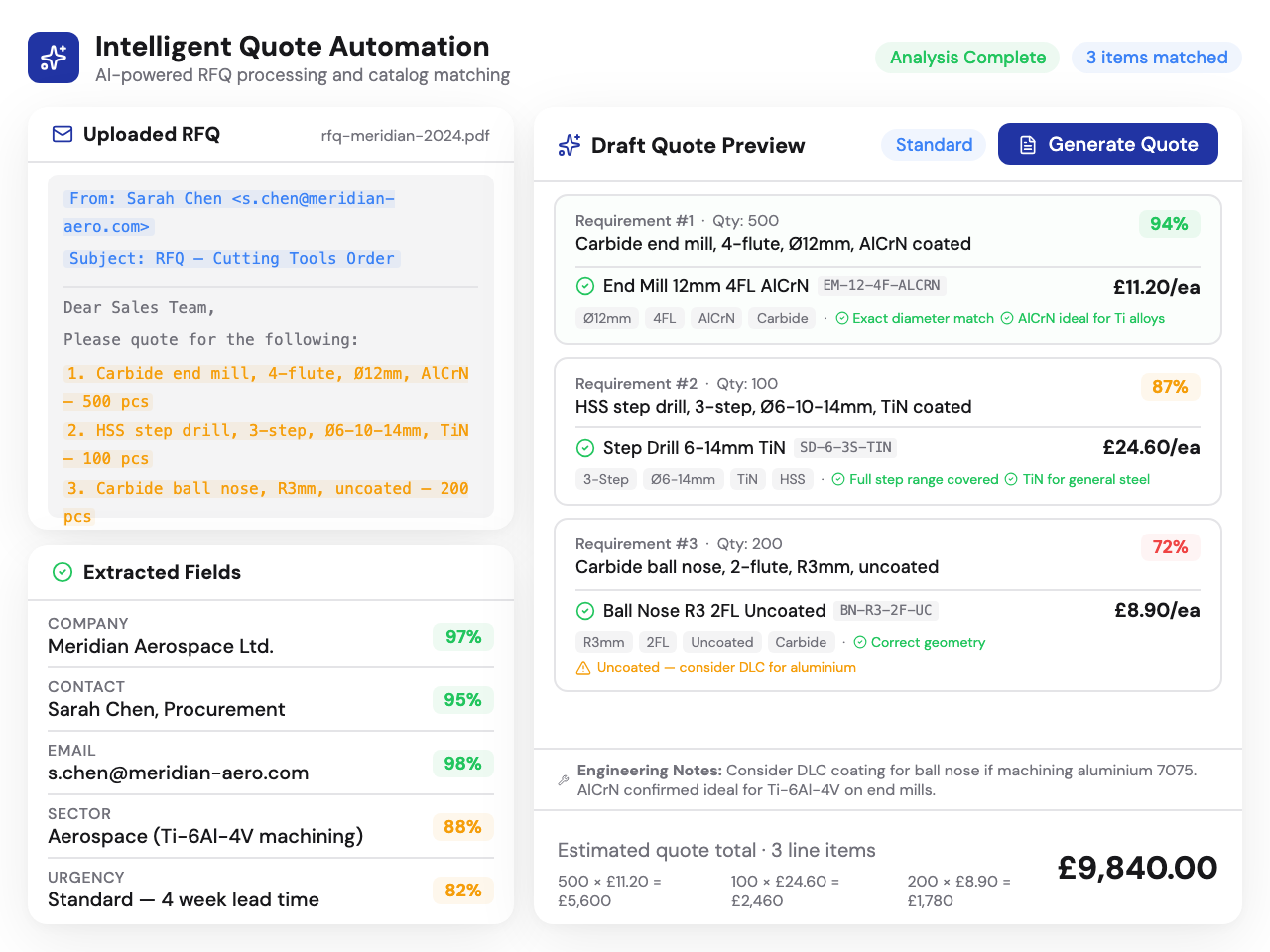
IQA is an AI agent that processes incoming RFQs - from uploaded documents, email attachments, or pasted text - and automatically configures quotes as if done by your best estimator. It extracts technical requirements, matches them to your product configurators, and prepares a draft quote for human review. It never sends a quote without your approval.
Key capabilities
Everything IQA adds to your Kabaido CPQ platform.
RFQ processor
Upload PDFs, spreadsheets, or paste raw text from customer requests. IQA extracts technical requirements, matches them to your configurators and catalogue, and drafts complete quotes for human review.
Document understanding
Reads technical drawings, spec sheets, purchase orders, and free-text emails. Understands manufacturing terminology - tolerances, surface finishes, material grades, thread specs - and extracts structured data from unstructured documents.
Email inbox integration
Connect your RFQ inbox. IQA monitors incoming emails, identifies RFQ requests, extracts attachments, and begins processing automatically. Draft responses are prepared for review - IQA never auto-responds.
AI copilot
Beyond RFQ processing, IQA acts as an intelligent assistant across your quoting workflow - suggesting configurations, flagging pricing anomalies, and helping your team work faster.
Quoting analytics
IQA makes analytics tailored to your quoting data and activity - win/loss patterns, response time trends, pricing accuracy, and recommendations to improve conversion rates.
Confidence scoring
Every extracted field gets a confidence score. High-confidence extractions proceed automatically. Low-confidence fields are flagged for human review with the source text highlighted. IQA learns from corrections over time.
From RFQ to draft quote - automatically
IQA processes raw customer requests into configured quotes. You review and approve.
Receive
RFQ arrives via email, file upload, or pasted text from any customer
Extract
AI reads documents, drawings, and specs - extracts structured requirements
Configure
Matches requirements to your configurators and catalogue products
Review
Draft quote prepared for your team - flagged fields need human approval
Deep dive
How IQA works
The agent receives RFQ documents (PDFs, emails, spreadsheets), extracts technical requirements (materials, dimensions, tolerances, quantities), matches them to your product configurators, and drafts a quote for human review. The flow: Receive RFQ → Extract requirements → Match to configurators → Draft quote → Human review and approval. What used to take 30 minutes of manual data entry happens in seconds.
Document understanding
IQA reads technical drawings, specification sheets, purchase orders, and free-text RFQ emails. It understands manufacturing terminology - tolerances, surface finishes, material grades, thread specifications - and extracts structured data from unstructured documents. Multi-item RFQs with different specs per line item are handled automatically, with each line mapped to the appropriate configurator.
Email integration
Connect your RFQ inbox. IQA monitors incoming emails, identifies RFQ requests, extracts attachments, and begins processing automatically. Draft responses are prepared for your review - IQA never auto-responds. Your team sees a prepared quote ready for review alongside the original email, reducing response time from hours to minutes.
Accuracy and confidence scoring
Every extracted field gets a confidence score. High-confidence extractions (material: K20 Carbide - 98%) proceed automatically. Low-confidence extractions (tolerance: ±0.02mm - 72%) are flagged for human review with the source text highlighted. IQA learns from corrections over time, improving accuracy with every quote your team processes.
Powered by Kai
IQA's document understanding, requirement extraction, and quote drafting all run on Kai — Kabaido's applied intelligence engine. Kai brings manufacturing domain knowledge to every document IQA processes, understanding materials, processes, tolerances, and tooling specifications at an application engineering level.
Learn more about KaiFrequently asked questions
Other platform modules
Get started with Intelligent Quoting Agent
Talk to us about adding IQA to your Kabaido CPQ platform. We'll walk you through the setup and show you how it fits your workflow.